How to Make a Slowed + Reverb, Sped Up or Nightcore Song
You heard a slowed and reverb version of a song (usually written slowed + reverb), or a sped up one, and want to make your own. You open an editor, pull the tempo down, and it sounds wrong: slower, but stiff, and still in the original key.
That is because the sound is not just "slower". It is slower and lower at the same time, with a big reverb on top. Here is what these edits are, the amounts people commonly use, and a quick way to make one.
What slowed + reverb and sped up actually are
Slow down a tape or a record and two things happen together: the tempo drops and the pitch drops with it. That is the "slowed" part, and it is usually traced back to the chopped and screwed tapes made in Houston in the 1990s. The "reverb" part is a long, roomy reverb over the whole mix, which blurs the edges and pushes the song further away.
Sped up is the same trick in reverse: faster playback, so the pitch climbs with the tempo. Nightcore is the older name for that idea, usually pushed further.
There are no rules, but most edits land in these ranges:
| edit | speed | pitch that comes with it |
|---|---|---|
| slowed + reverb | around 0.8x to 0.9x | about 2 to 4 semitones down |
| ultra slowed | around 0.7x | about 6 semitones down |
| sped up | around 1.1x to 1.25x | about 2 to 4 semitones up |
| nightcore | around 1.25x to 1.35x | about 4 to 5 semitones up |
The quick way: make it in your browser
- Open the slowed + reverb maker and drop your song on the page, or press Choose file. It accepts mp3, wav, flac, m4a, aac, ogg, aiff or a video, up to 300 MB.
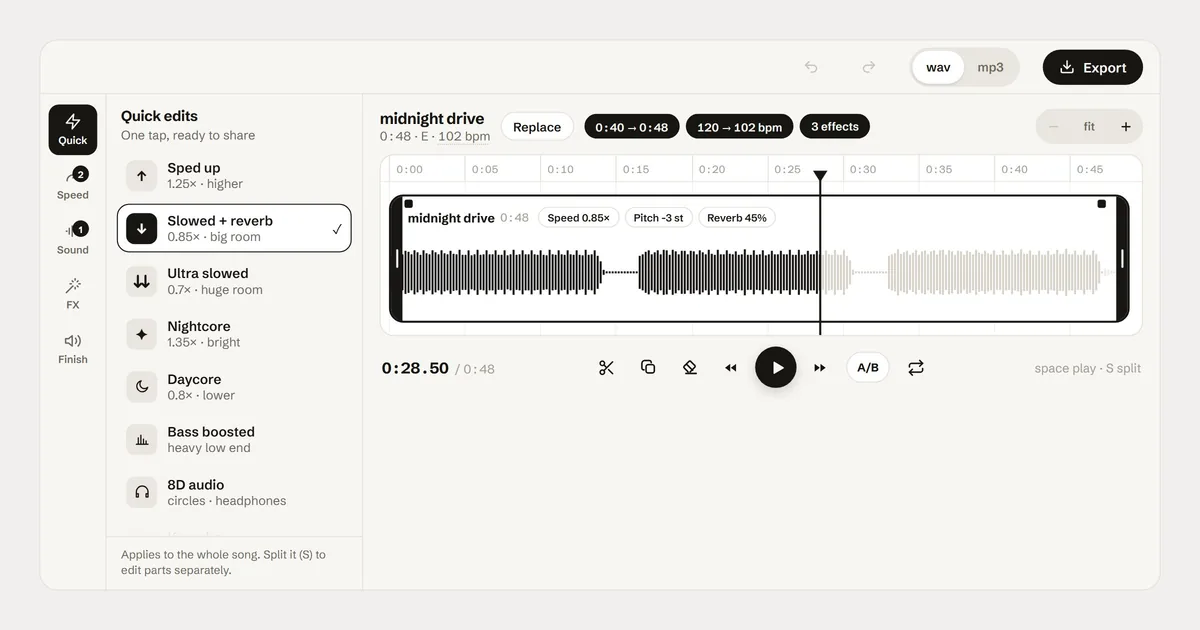
- When the song opens, the Slowed + reverb preset is applied for you: speed at 0.85x, pitch 3 semitones lower, reverb at 45%. Press play and listen.
- For a different edit, tap another preset in the Quick list: Ultra slowed (0.7x, 6 semitones down, more reverb), Sped up (1.25x, 4 semitones up) or Nightcore (1.35x, 5 semitones up, a little bass boost). A tap replaces whatever was on. A tap on the active preset clears it.
- To fine-tune, open the Speed group and tap the Speed or Pitch row to get a slider. Open Sound and tap Reverb to set how much room you hear.
- Press A/B to hear the original at the same spot, and again to return to your edit.
- Choose wav or mp3 at the top and press Export.
A few details worth knowing:
- Speed and pitch are separate controls. The Speed slider on its own changes the tempo and leaves the key alone. The presets move both to get the tape sound, so if you set your own speed, move Pitch to match (the table above gives the pairs).
- Slower means longer. A 3 minute song runs about 3:32 at 0.85x and 2:24 at 1.25x. The export also lets the reverb ring out after the last note, close to 2 seconds at the preset's setting.
- Nothing is uploaded. The file is read and processed in your browser.
- Exports are mp3 at 320 kbps or wav. The wav is 16-bit if the file you loaded was a wav or flac at 16-bit or lower, and 24-bit for anything else.
- There is a length cap. The finished edit can run to roughly 12 minutes at 44.1 kHz (11 at 48 kHz), about half that on a device that reports 4 GB of memory or less. A song fits, a full DJ mix does not.
Other ways, and when they are the better choice
A DAW, or Audacity. Switch off time stretching by putting the clip in a repitch or resample mode, so the pitch follows the speed, then add a reverb to the whole mix. Audacity is free and has a speed change effect that moves tempo and pitch together. This is the better route when you want detailed control of the reverb (decay time, pre-delay, EQ on the wet signal), a slowdown that changes over time, or the edit is one piece of a bigger project.
The video editor on your phone. Fine when the sound is going under a clip you are already cutting. Reverb controls tend to be basic, and the result is usually a video, not an audio file.
A tempo change with no pitch change. If you want a song slower but still in its key, to practice along or to fit a DJ set, use the bpm changer instead. The pitch changer moves the key alone.
Tips and common mistakes
- Leave keep vocal character off. That switch in the Pitch row keeps a singer sounding like the same person after a pitch change. For these edits the deeper or brighter voice is the point.
- Too much reverb. Lowering a song adds weight to the low end, and reverb piles on. If the mix turns to mud, pull Reverb back first.
- Start from a good file. Lowering the pitch also lowers the point where a low bitrate mp3 runs out of treble, so a dull source gets duller.
- One part only. Press S, or the split button under the waveform, to cut the song at the playhead, then give each piece its own settings.
Posting edits of songs you do not own
Making an edit for your own listening is one thing. Uploading it is another. Changing the speed does not make a song yours: the recording and the song still belong to their owners, and publishing your version needs their permission. Platforms can often match a slowed or sped up upload to the original, and it may be claimed, muted or removed.
Common questions
How much should I slow a song down for slowed + reverb?
Typically 10 to 20 percent slower (0.8x to 0.9x), with the pitch 2 to 4 semitones down. The preset in the slowed + reverb maker, 0.85x and 3 semitones down, sits in the middle.
What is the difference between sped up and nightcore?
How far you push it, mainly. Nightcore takes its name from a Norwegian duo who sped up dance tracks in the early 2000s, and it tends to go further and brighter. "Sped up" is the newer label, common on short video apps, and often milder. The nightcore maker is the same editor, opened with the Nightcore preset on.
Should I export mp3 or wav?
mp3 for sharing or keeping on your phone, since it is much smaller. wav if the file is going into a DAW or a video editor, or you plan to edit it again: every extra round of mp3 encoding loses a little.
Slower and lower with reverb, or faster and higher: drop a song into the slowed + reverb maker and hear it for yourself.