How to Find the Key and BPM of Any Song, by File or by Ear
You have a song, a sample or a beat, and before you can do much with it you need two facts: its key and its tempo. Tuning a vocal, lining up a remix and choosing the next track in a DJ set all start from those two.
With the audio file, a detector reads both in one go. Without it, your hands and ears can get there. Learn both, because detectors trip over the same two things, and your ears are how you catch it.
The fastest way: drop the file in
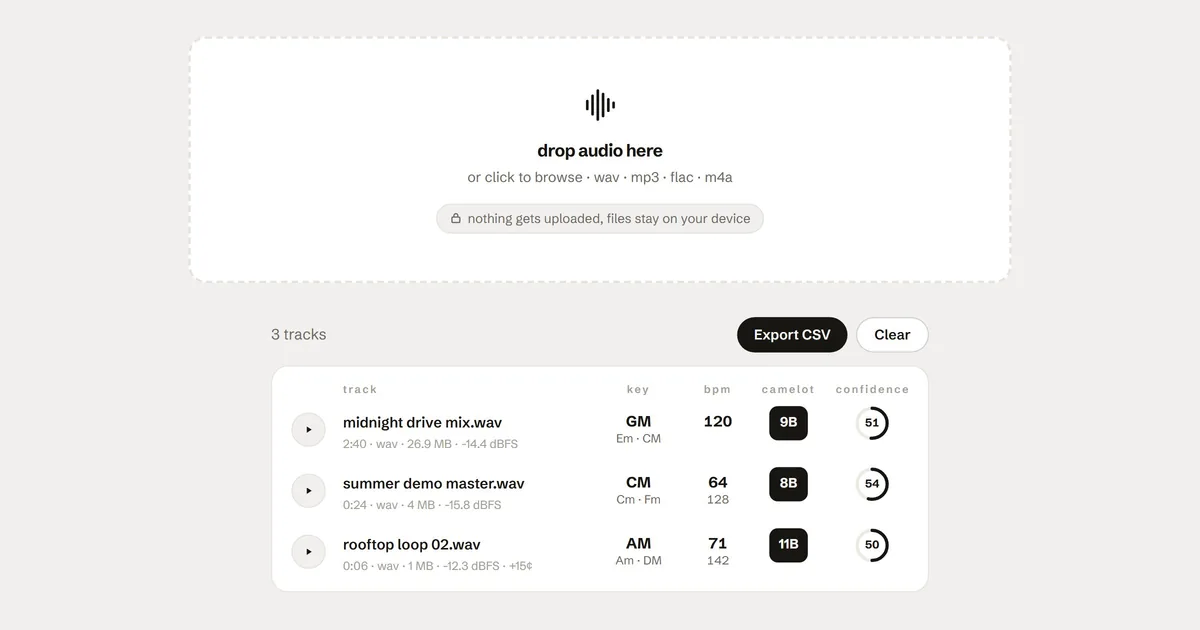
- Open the key and bpm finder.
- Drag your song onto the box that says drop audio here, or click it to browse. It lists wav, mp3, flac and m4a, and you can drop several files at once.
- Each file gets a row that reads "analysing" until it is done, one file at a time.
- Read the finished row under "key", "bpm", "camelot" and "confidence". The Camelot code is DJ shorthand for the same key: a number from 1 to 12, plus A for minor or B for major.
- Press the round play button on the row to listen while you check. Export CSV saves the finished rows as a csv file.
A few details worth knowing:
- Keys are written short, with sharps. Am is A minor, CM is C major, and B flat minor shows as A#m.
- The small print is a second opinion. Under the key sit the next two keys on the detector's list. Under the bpm, a reading of 140 or more also shows its half, and one under 90 shows its double.
- Confidence is about the key only. It is a score out of 100 for how well the top key fits and how far it leads the runner-up. It says nothing about the tempo.
- One answer per file. One key and one whole-number tempo between 60 and 190, even if the song changes partway.
- Nothing leaves your device. The drop box says "nothing gets uploaded, files stay on your device". Finished results, the latest 200 at most, stay listed in your browser until you press Clear. The audio is not kept, so rows from an earlier visit have no play button.
- There are limits. 300 MB per file, and roughly 37 minutes of stereo audio at 44.1 kHz. A song fits easily. An hour-long stereo mix does not.
The two classic confusions
Half time or double time
Music has pulses at several speeds stacked on top of each other, and a detector has to pick one. The same trap beat can be counted at 70 or at 140.
Neither number is wrong, since one is exactly twice the other. Go with the one your genre writes down: trap is usually written at around 140 with the snare on beat 3, even though heads nod at 70. If the main number feels twice too fast or too slow, look at the figure under it. Readings from 90 to 139 show none, so halve or double those yourself.
Relative major or minor
Every major key has a relative minor made of the exact same seven notes. C major and A minor are both the white keys of a piano. The minor's home note sits three semitones below the major's (three piano keys down, black ones included).
Key detectors typically measure how much of each note is in the song, and for a relative pair that looks nearly the same. The difference is which note feels like home, a judgment about the music. So when the result says CM and you expected Am, see whether the other one is in the small print.
For DJs this mix-up barely matters. A relative pair shares a number, like 8A for A minor and 8B for C major, and the Camelot wheel lists that "relative switch" under "safe moves".
No file? Tap the tempo
Play the song, open the bpm tapper, and click the round tap pad on every beat, or press space. The reading starts at the second tap. The line under it adds a "half" figure at 120 and above, or a "double" figure below 100.
After a few taps it ignores any gap that is far off the rest, so one sloppy tap does not wreck the count. Pause for more than two seconds and the next tap starts fresh.
No screen at all? Count the beats for 15 seconds and multiply by 4. Thirty-two beats means 128 bpm.
No file? Find the key by ear
- Hum along until you land on the note the song keeps coming back to, the one that would sound finished if everything stopped on it. Often it is the last note of the chorus.
- Find that note on a piano, a guitar or a keyboard app. That letter names the key.
- Play the note four semitones above it, then the note three above. Whichever fits the song settles it: four means major, three means minor.
For a second check, open the scale and chord finder, choose i have some notes, and tap a few notes from the melody on its piano. Under "keys these notes fit" it lists the matching keys.
When to trust the detector and when to check by ear
| what you have | what to do |
|---|---|
| steady drums, a full arrangement, high confidence | take the result |
| the relative key listed in the small print | listen for which chord feels like home |
| a vocal alone, drums alone, or a sparse intro | check by ear, there is little to measure |
| a live band or an old recording | tap it, the tempo may drift |
| a key change partway through | trim to the part you need in the audio cutter, then analyze that |
Common mistakes
- Mixing up relative and parallel. A minor and C major share their notes. A minor and A major do not.
- Ignoring tuning. If the line under a file's name ends with a number of cents, the recording sits about that far off standard A440 tuning, as sped up or slowed down samples often do. Parts added in standard tuning can sound sour against it.
Common questions
Why do two key finders disagree on the same song?
Usually one of three things: the same key spelled with a sharp or a flat (A#m and Bbm are one key), a relative major and minor pair, or a song that really sits between two readings. Hum the home note and decide for yourself.
Is 70 bpm the same as 140 bpm?
For lining things up, yes: every beat at 70 lands on every second beat at 140. Only the counting changes.
Can I find the key of a song I only have as a link?
The key and bpm finder works on audio files, not links. For a stream, tap the tempo and find the home note by ear.
Got the file? Drop it into the key and bpm finder, then let your ears sign off on the answer.