How to Calculate Delay and Reverb Times From Your Song's BPM
A delay that repeats in time with the song sounds like part of the groove. A delay that is slightly off drifts further from the beat with every repeat, until it sounds like a mistake. Reverb has a similar problem: a tail that rings too long blurs whatever comes next.
The fix is one small piece of arithmetic. Here is the formula, a table to check it against, and a way to skip the math.
The one formula
One beat in milliseconds is 60,000 divided by the BPM.
A minute is 60,000 milliseconds, so dividing by beats per minute gives you the length of one beat, which a DAW normally counts as a quarter note. At 100 BPM that is 60,000 / 100 = 600 ms.
Every other value comes from that number. Halve it for an eighth note, halve it again for a sixteenth, double it for a half note. Multiply by 1.5 for a dotted note, or by two thirds for a triplet.
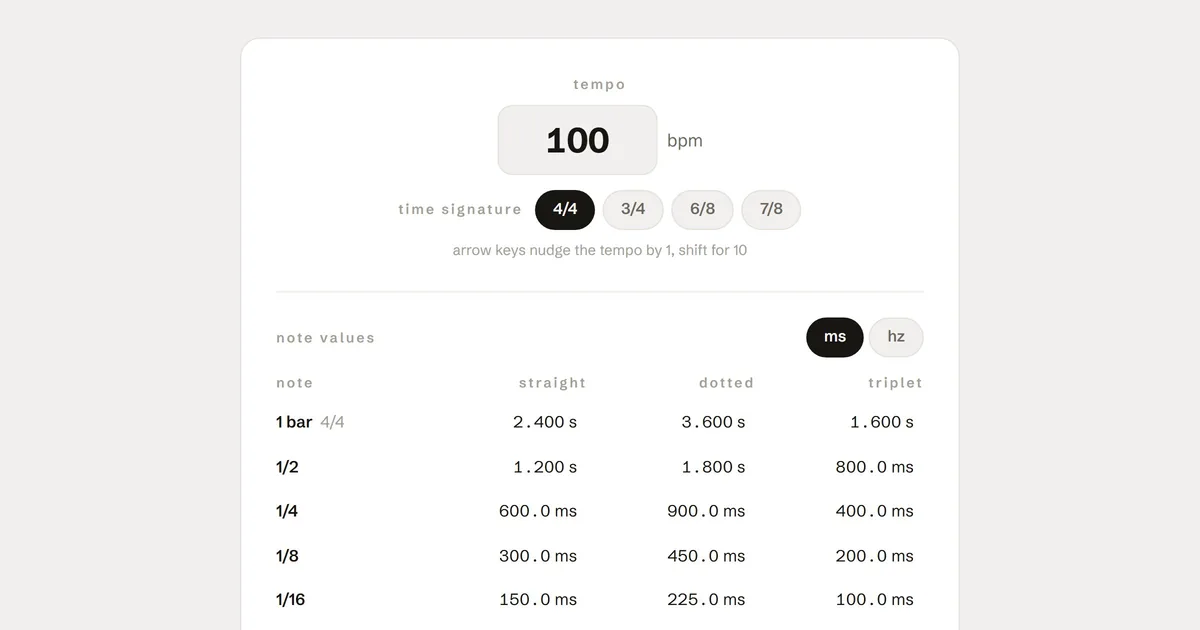
At 100 BPM that gives you:
| note | straight | dotted | triplet |
|---|---|---|---|
| half (1/2) | 1,200 ms | 1,800 ms | 800 ms |
| quarter (1/4) | 600 ms | 900 ms | 400 ms |
| eighth (1/8) | 300 ms | 450 ms | 200 ms |
| sixteenth (1/16) | 150 ms | 225 ms | 100 ms |
The quick way: let the calculator do it
- Open the delay & reverb calculator, type your tempo into the tempo box and press Enter. It accepts 20 to 999 bpm, to one decimal place.
- Pick a time signature: 4/4, 3/4, 6/8 or 7/8.
- Read the "note values" table. It has a row for 1 bar and for every note from 1/2 down to 1/128, in "straight", "dotted" and "triplet" columns. Values of a second or more are shown in seconds, so 1,200 ms reads 1.200 s.
- Click the value you want. It is copied as a plain number in ms, even when the cell shows seconds, and the cell reads "copied" for a moment. Paste it into your delay's time field.
- For reverb, scroll down to "reverb starting points" and copy a pre-delay and a decay time the same way.
A few details worth knowing:
- The time signature only changes how long a bar is. The 1 bar row and the reverb decays move with it. The rows from 1/2 down stay put. The tool counts BPM in quarter notes, so a bar of 6/8 is 3 beats and a bar of 7/8 is 3.5.
- It works backwards. Type a time in ms into the box under what note is my delay? and the tool names the closest note value at your tempo, then lists the tempos between 40 and 240 bpm where that time is an exact note value. Click one to switch to that tempo.
- The hz button is for LFOs. It switches the table from times to rates in Hz, and a click then copies the Hz number.
Reverb: pre-delay and decay
Pre-delay is the gap between the dry sound and the start of the reverb. With no gap, the reverb sits on top of a vocal and softens the words. A short gap lets each syllable land first.
For vocals it typically ends up around 20 to 80 ms. The calculator offers two starting points tied to the tempo: pre-delay, tight is a 1/64 note and pre-delay, roomy is a 1/32 note. At 100 BPM those are 37.5 ms and 75 ms. Start tight and raise it if the vocal still sounds washed out.
Decay is how long the tail takes to die away. A common rule of thumb: it should fade before the next phrase needs the room. The calculator sizes it to the bar: short decay is half a bar, medium decay is 1 bar, long decay is 2 bars and hall decay is 4 bars. At 100 BPM in 4/4 a bar lasts 2,400 ms, so those are 1.2, 2.4, 4.8 and 9.6 seconds.
There is also tail before next phrase: 1 bar minus the tight pre-delay, so the two together fill exactly one bar. At 100 BPM in 4/4 that is 2,400 minus 37.5, or 2,362.5 ms.
Treat these as starting points. Dense, fast songs often want shorter tails than the math suggests.
Other ways to do it
Your delay's sync button. Most delay plugins can lock to the project tempo and let you pick a note value directly. If yours does and the project tempo is right, use it. You still need milliseconds for reverb pre-delay and decay, which are usually set in ms and seconds, and for pedals, hardware and plugins with no sync.
Tap tempo. Many delay pedals and hardware units have a tap button. That is the better choice on stage, where the tempo is whatever the drummer is playing.
Your ears. Not every delay belongs on the grid. A slapback echo of roughly 80 to 120 ms works at almost any tempo.
Tips and common mistakes
- Get the tempo right first. Set a quarter note delay for 101 BPM on a 100 BPM song and each repeat drifts about 6 ms further ahead of the beat. By the eighth repeat that is nearly 48 ms. If you do not know the tempo, tap along in the bpm tapper or load the song into the key & bpm finder.
- Try the dotted eighth. It is a classic rhythmic delay: the first repeat lands between the eighth notes you play instead of on top of them. At 100 BPM that is 450 ms.
- Half time and double time give the same numbers. They sit one row apart: a quarter note at 70 BPM is about 857 ms, and so is a half note at 140 BPM.
Common questions
How do I convert ms to BPM?
Flip the formula: BPM is 60,000 divided by the time in ms, if that time is one beat. So 500 ms is 120 BPM. The catch is that one time can be several note values: 375 ms is a quarter note at 160 BPM, a dotted eighth at 120 BPM or an eighth note at 80 BPM. The what note is my delay? box in the calculator lists the matches for you.
What is a good pre-delay for vocals?
No single number is right, but around 20 to 80 ms is typical. A 1/64 note is a handy starting point because it follows the tempo: about 31 ms at 120 BPM and about 54 ms at 70 BPM.
What is the difference between a dotted and a triplet delay?
A dot adds half of the note's length again, so a dotted eighth lasts as long as three sixteenths. A triplet fits three notes into the space of two, so each one is two thirds as long.
Next time a delay or reverb feels like it is fighting the song, type the tempo into the delay & reverb calculator and copy the numbers.