How to Tell If an MP3 Is Really 320 kbps or an Upscaled Fake
A file that says 320 kbps is only telling you how it was saved last. Take a 128 kbps rip, export it again at 320, or as WAV or FLAC, and you get a bigger file with the same damaged audio inside. The label goes up. The quality does not.
The file name, the size and the bitrate in your player will not show it. The high frequencies will, and checking takes one drag and drop.
The quick way: let a checker measure it
- Open the audio quality checker.
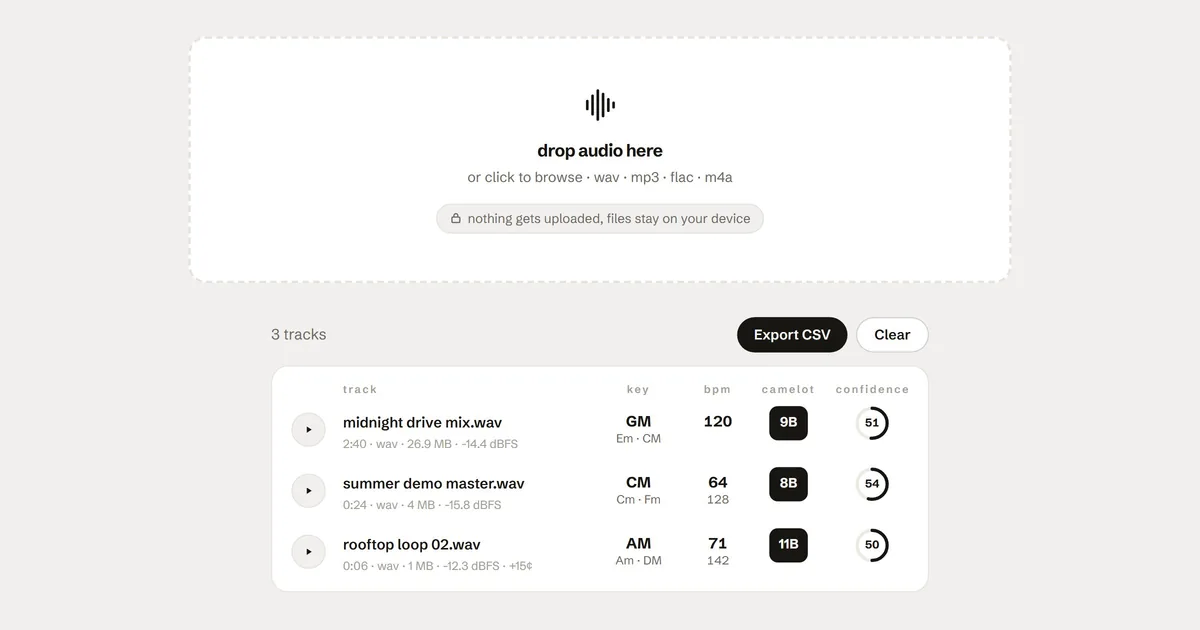
- Drag your file onto the box that says drop a track here, or click it to browse. It lists mp3, wav, flac, m4a, ogg, aiff, "even video".
- Wait for the progress bar. The whole file is measured, and the result appears under the Quality tab.
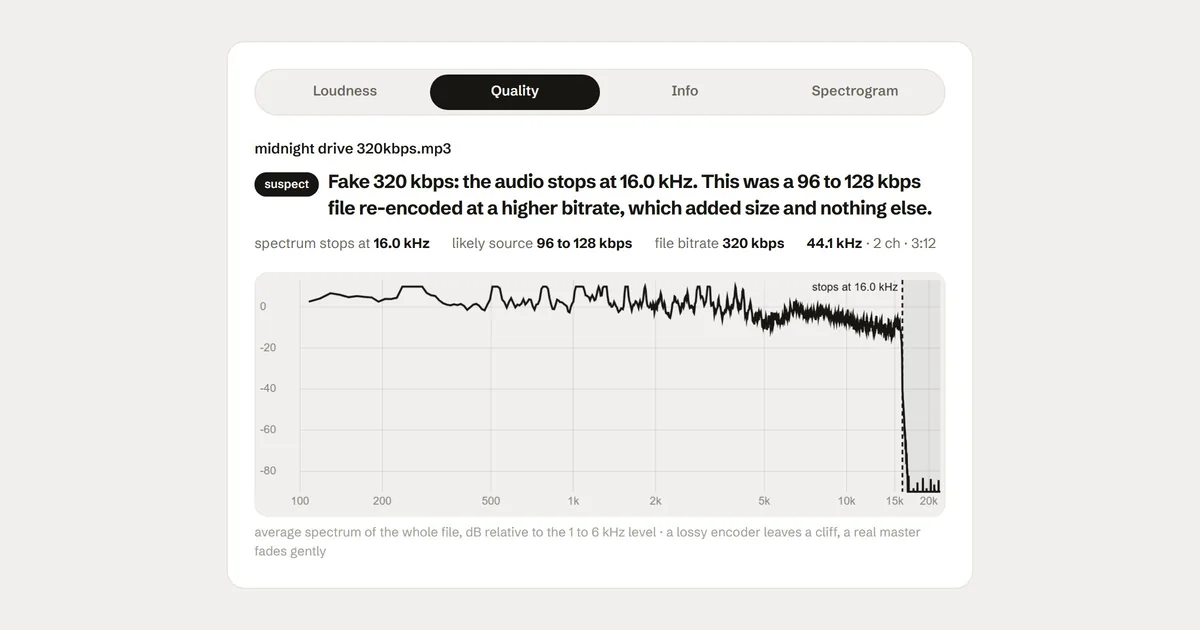
- Read the verdict: a badge that says "clean", "close" or "suspect", and one bold sentence.
- Check the plot underneath. If the tool found a ceiling, a dashed line marks it with "stops at" and the frequency, and the band above it is shaded.
The file is read in your browser. The drop box says so itself: "nothing gets uploaded, files stay on your device".
Why the top of the spectrum gives it away
To shrink a file, a lossy encoder throws away sound you are unlikely to miss, and the very top of the spectrum goes first. The lower the bitrate, the lower the cut. Typical MP3 ceilings, which shift with the encoder and its settings:
| bitrate | where the audio usually stops |
|---|---|
| 128 kbps | around 16 to 17 kHz |
| 192 kbps | around 18 to 19 kHz |
| 320 kbps | around 20 kHz, sometimes a little above |
| lossless from a CD | up to about 22 kHz |
Once those highs are gone, nothing brings them back, and a second pass through a lossy encoder tends to add a little damage of its own. So a "320" or a FLAC with a hard wall at 16 kHz very likely started out as a low bitrate file.
How to read the verdict
The sentence weighs the file's label, its bitrate or its lossless format, against where the audio actually ends. Four you may see, in the tool's own words:
- "Genuine 320-class: the bitrate matches the bandwidth."
- "Genuine lossless: the spectrum runs all the way up."
- "Fake 320 kbps: the audio stops at 16.0 kHz. This was a 96 to 128 kbps file re-encoded at a higher bitrate, which added size and nothing else."
- "Lossless container, lossy source: the audio stops at 16.0 kHz, so this FLAC was made from a 96 to 128 kbps file."
The first two come with the "clean" badge, the last two with "suspect".
A few details worth knowing:
- A ceiling only counts if it is a cliff. The tool looks for a sudden drop of 18 dB or more in the highs. On 44.1 and 48 kHz files, a ceiling at 20 kHz or higher counts as full bandwidth.
- The bitrate is measured, not read from a tag. The "file bitrate" under the verdict, shown for lossy formats, is the file's size divided by its length. Tags and embedded artwork count toward the size, so it can read higher than your player's figure.
- 280 kbps or more is judged as a 320-class claim. If such a file stops between 19 and 20 kHz, the verdict starts with "Close" and points to a 256 kbps source. Lower bitrates are checked against their own number, and the verdict starts with "Honest" or "Worse than it says".
- The "likely source" guess follows MP3 habits. It is based on the default cutoffs of LAME, a widely used MP3 encoder. A wall between 18 and 19 kHz, for example, reads "about 192 kbps".
- There are limits. One file at a time, nothing over 500 MB on the Quality tab, and a length cap the tool puts at 37.7 minutes for stereo at 44.1 kHz.
Check it by eye in a spectrogram
Click the Spectrogram tab and the same file becomes a picture. Time goes across, frequency goes up, and color shows level: black for silence, brightening toward pale yellow as the sound gets louder.
- A fake ends in a flat, ruler-straight edge at the same height for the whole track, with black or near black above it.
- A full-range file has a ragged top. Cymbals and hi-hats reach the upper edge, and quiet passages fade out gradually.
The frequency scale is logarithmic, so on a 44.1 kHz file everything above 16 kHz sits in roughly the top 5 percent of the picture. Look closely at the upper edge, or press Download spectrogram PNG for a 1920 by 960 image. The spectrogram tool opens this view directly.
Other ways to check, and when they are better
A desktop spectrum viewer. Spek, or the spectrogram view in Audacity, shows the same kind of picture. Useful offline, and Audacity lets you zoom into one section.
The file info. The Info tab, also reachable as the audio file inspector, shows the codec, the bitrate and the encoder name when the file carries one. That is the label, not the audio, but it is a fair first look: a file that admits to 128 kbps needs no further test. File size is no help: 320 kbps works out to about 2.4 MB per minute, fake or real.
Your ears. Lossy damage can be audible: swishy cymbals, smeared hi-hats, a dull top. But hearing above 16 kHz fades with age, so a clean listen does not clear a file.
What to do with a fake
Find a better source. Buy or download the track again from a shop that sells lossless files, ask the artist or label, or go back to the original bounce. Then run the new copy through the checker before you trust it.
Once you have the real file and need a smaller copy, convert down from it: the audio converter writes mp3, wav, flac and other formats.
Common mistakes
- Reading every low ceiling as a fake. Old recordings, tape transfers and lo-fi masters can roll off early with no MP3 involved. In the plot, a gentle slope points to the recording and a vertical cliff to an encoder.
- Reading a full spectrum as proof of lossless. A 320 kbps MP3 reaches about 20 kHz, so a FLAC made from one can pass. The "likely source" line is upfront about it: "full bandwidth: lossless or 320 kbps class".
Common questions
Can a FLAC or WAV be fake?
Yes. A lossless format stores whatever it is given, including audio that was an MP3 a minute ago. The file is a real FLAC. The sound inside is still the MP3.
Is a 16 kHz cutoff always a 128 kbps MP3?
No. It is strong evidence, not proof. AAC, Ogg Vorbis and Opus place their ceilings differently from MP3, and audio pulled from online video often stops near there too.
Not sure about a file? Drop it into the audio quality checker and see where its spectrum stops.